

Invoice Image Billing Software | Convert Images into Bills
Invoice Image Billing Software helps businesses convert invoice images into digital bills quickly and efficiently. Upload an invoice image, extract product and billing details, and create a new bill without manually entering every item. SonicBillX helps simplify invoice processing and reduce repetitive data entry.
With Invoice Image Billing Software, businesses can process invoice information more efficiently and reduce manual data entry. SonicBillX helps extract relevant product, quantity, price and tax information from invoice images so users can organize billing details more conveniently.
Just upload your supplier invoice, and SonicBillX reads the important details automatically. It fills in the supplier name, invoice number, invoice date, product details, quantity, price, GST, and total amount. You can check the details, make any changes if needed, and then save the purchase bill with confidence.
What is Invoice Image Billing Software?
OCR Billing Software helps you create purchase bills without typing all the invoice details manually. Simply upload a supplier invoice as an image or PDF, and the software automatically reads the information and prepares the purchase bill within seconds.
It can capture important details like the supplier name, invoice number, invoice date, product names, quantity, price, GST, and total amount. You only need to review the information and save it, making purchase entry much faster and easier.
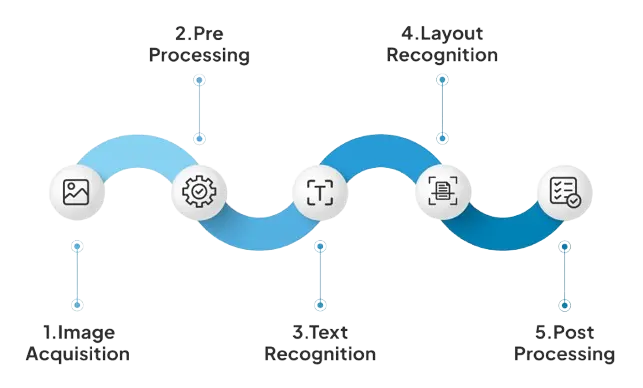
The software uses OCR (Optical Character Recognition) technology, which can read printed text from invoice images and PDF documents automatically. This reduces manual typing, minimizes errors, and saves valuable time.
How It Works
- Upload or scan your purchase bill
- Software reads all details automatically
- Items, GST, and totals are filled instantly
- Bill is created in seconds
- Inventory updates automatically
Why Invoice Image Billing is Better Than Manual Entry
Compare how SonicBillX OCR Billing Software automates invoice processing,
reduces manual work, and improves business accuracy compared to traditional
manual data entry.
| Feature | SonicBillX OCR Billing | Manual Entry |
|---|---|---|
| Invoice Scanning | ✔ | ✖ |
| Automatic Invoice Reading | ✔ | ✖ |
| GST Information Extraction | ✔ | ✖ |
| Fast Invoice Processing | ✔ | ✖ |
| Inventory Update | Automatic | Manual |
| Accounting Synchronization | Automatic | Manual |
| Duplicate Invoice Detection | ✔ | ✖ |
| Data Entry Errors | Minimal | Higher |
| Business Reports | Advanced | Basic |
| Cloud Access | ✔ | ✖ |
Why Businesses Need Invoice Image Billing Software
Manual purchase entry becomes more difficult as the number of supplier invoices increases. It requires extra effort, slows down daily work, and makes it harder to maintain accurate records.
- Less time spent on repetitive invoice entry
- Better accuracy for purchase and GST details
- Automatic inventory updates after every purchase
- Faster and more organized purchase management
SonicBillX OCR Billing Software helps automate the entire purchase entry process, allowing your team to work faster and focus on growing the business.
Key Features of Invoice Image Billing Software
1. Automatic Bill Entry
- Scan invoices and bills easily
- Data fills automatically
- No manual typing required
2. Fast Billing & Checkout
- Smart item recognition for faster invoice generation
- Works online and offline for uninterrupted billing
3. GST & E-Invoice Compliance
- Auto-validates GST details
- Generates government-compliant invoices instantly
4. Inventory Synchronization
- Updates stock automatically from scanned invoices
- Alerts for low-stock and auto-reorder
5. Multi-Device Support
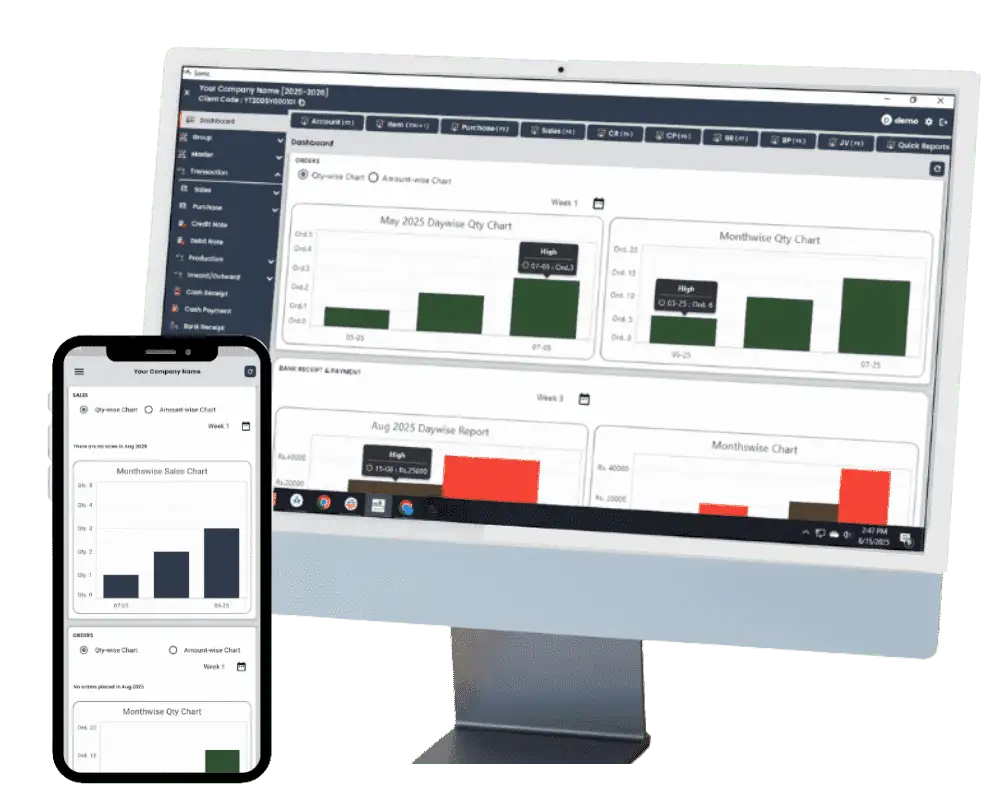
- Use on desktop, tablet, or mobile
- Centralized data for all branches
- Access anytime, anywhere
Why Choose SonicBillX Invoice Billing Software?
- Trusted by retailers and restaurants
- Easy to use for any business
- Affordable pricing plans
- Dedicated customer support
- Quick setup and onboarding
Benefits of Invoice Image Billing Software
- Save time on billing
- Reduce manual errors
- Faster billing process
- Easy inventory management
- Secure and reliable system
- Access from multiple devices
Industries That Use Invoice Image Billing Software
- Retail Stores
- Restaurants & Cafes
- Supermarkets & Grocery Stores
- Pharmacies
- Small & Medium Enterprises (SMEs)
Try it yourself and see how quickly you can create bills without manual work.
Pricing & Free Demo
Try SonicBillX and see how automatic invoice processing makes purchase management faster, simpler, and more accurate.
Start Faster Billing Today – Book Your Free Demo
Download Now!
Sonic Software Available On


Frequently Asked Questions (FAQ)
OCR Billing Software helps you create purchase bills automatically by reading invoice images or PDF files. It reduces manual typing and saves time.
Simply upload a supplier invoice as an image or PDF. The software reads the invoice details, fills the purchase bill automatically, and lets you review the information before saving.
The software can read the supplier name, invoice number, invoice date, product details, quantity, price, GST details, and total invoice amount.
No. Most of the invoice details are captured automatically. You only need to verify the information and save the purchase bill.
Yes. You can review and make changes to the extracted information before creating the final purchase bill.
Yes. Once the purchase bill is saved, SonicBillX automatically updates your inventory and stock quantities.
Yes. SonicBillX supports invoice images captured using a mobile phone or scanner, as well as PDF invoices.
Yes. It is ideal for small businesses as well as growing enterprises that want to save time and reduce manual data entry.
It is suitable for retailers, wholesalers, distributors, supermarkets, pharmacies, manufacturers, electronics stores, grocery stores, and many other businesses that receive supplier invoices.
Since the software reads invoice details automatically, it minimizes typing mistakes, duplicate entries, and incorrect GST values, making your purchase records more accurate.
Yes. Every purchase bill automatically updates inventory records and keeps your purchase and accounting data synchronized.
Yes. You can request a free demo to see how SonicBillX simplifies purchase invoice processing and saves valuable time for your business.